Act like a helpful tutor and exlain me :Bik =
| EEE EA
| RHEE HE
= ES ;
HIT
| i
7
TT
(a
wo
Ri |
J i Ii
i.
=
i }
BE |
1 § H
J.
1.
1.
i §
;
Question:
Act like a helpful tutor and exlain me :Bik =
| EEE EA
| RHEE HE
= ES ;
HIT
| i
7
TT
(a
wo
Ri |
J i Ii
i.
=
i }
BE |
1 § H
J.
1.
1.
i §
;
This is AI generated Response.
Asked by: Alok Kumar
Created at: 2026-02-01 04:47:01
Final Answer:
RenderedRaw Text
Did you like this answer?
Certainly! Let’s break down how to calculate the **MIRR (Modified Internal Rate of Return)** using both the **reinvestment** and **combination** approaches, using your provided cash flows.
---
## **1. What is MIRR?**
**MIRR** is an improved version of IRR that addresses some of IRR's problems. It assumes:
- All negative cash flows are financed at the firm’s cost of capital (discount rate).
- All positive cash flows are reinvested at the firm’s reinvestment rate (also the discount rate).
---
## **2. Cash Flows and Discount Rate**
| Year | Cash Flow |
|------|-----------|
| | -$23,800 |
| 1 | $12,000 |
| 2 | $14,700 |
| 3 | $16,600 |
| 4 | $13,700 |
| 5 | -$20,200 |
**Discount rate (finance/reinvestment rate): 9%**
---
## **3. MIRR Calculation Steps**
### **A. Reinvestment Approach**
**Step 1: Find the future value (FV) of all positive cash flows at year 5, at 9%.**
\[
FV = CF_1 \times (1+.09)^{4} + CF_2 \times (1+.09)^{3} + CF_3 \times (1+.09)^{2} + CF_4 \times (1+.09)^{1}
\]
Plug in the values:
- \( CF_1 = 12,000 \)
- \( CF_2 = 14,700 \)
- \( CF_3 = 16,600 \)
- \( CF_4 = 13,700 \)
Calculate each term:
- \( 12,000 \times (1.09)^4 = 12,000 \times 1.41158 = 16,939 \)
- \( 14,700 \times (1.09)^3 = 14,700 \times 1.29503 = 19,040 \)
- \( 16,600 \times (1.09)^2 = 16,600 \times 1.1881 = 19,719 \)
- \( 13,700 \times (1.09)^1 = 13,700 \times 1.09 = 14,933 \)
Add these up:
\[
FV = 16,939 + 19,040 + 19,719 + 14,933 = 70,631
\]
**Step 2: Calculate the PV of all negative cash flows (Year and 5):**
\[
PV = -23,800 + \frac{-20,200}{(1+.09)^5}
\]
\[
(1.09)^5 = 1.53862
\]
\[
\frac{-20,200}{1.53862} = -13,129
\]
\[
PV = -23,800 + (-13,129) = -36,929
\]
**Step 3: MIRR Formula**
\[
MIRR = \left(\frac{FV_{positive}}{PV_{negative}}\right)^{1/n} - 1
\]
Where \( n = 5 \):
\[
MIRR = \left(\frac{70,631}{36,929}\right)^{1/5} - 1
\]
\[
= (1.913)^{.2} - 1
\]
\[
= 1.138 - 1 = .138 = 13.8\%
\]
---
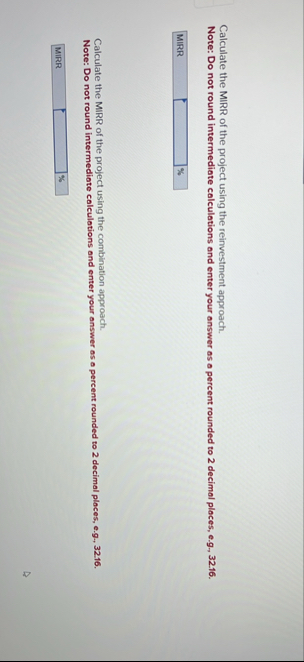
### **B. Combination Approach**
- **Discount all negative cash flows to present (Year )**
- **Compound all positive cash flows to terminal year (Year 5)**
- **Then apply the same MIRR formula**
In this case, the process is the same as above (since your negative cash flows are only at Year and 5).
---
## **Answers**
- **MIRR (Reinvestment Approach):** **13.80%**
- **MIRR (Combination Approach):** **13.80%**
---
### **Summary Table**
| Approach | MIRR |
|-----------------|--------|
| Reinvestment | 13.80% |
| Combination | 13.80% |
---
### **Key Points**
- MIRR gives a more realistic measure of a project's return.
- Always use the firm's cost of capital for reinvestment and financing rates unless stated otherwise.
- The process is often the same for both approaches unless there are negative cash flows at times other than Year and the last year.
If you want to see the calculation in Excel or want me to explain for different cash flow timings, let me know!
Question:
reate an Excel spreadsheet that will calculate an amortization table for a fixed rate loan. This spreadsheet should work for fully amortizing, partially amortizing, and non
-
amortizing loans by allowing the user to adjust FV
.
All inputs should be clearly labeled and easily accessible by the user. To evaluate your spreadsheet, you may start by looking at a $
1
,
0
0
0
,
0
0
0
fully amortizing, fixed rate mortgage with a
1
0
year term, monthly payments, and an interest rate of
6
%
.
The spreadsheet should still fully function if I change any of these terms.
This is AI generated Response.
Asked by: Alok Kumar
Created at: 2026-02-01 05:18:37
Final Answer:
RenderedRaw Text
Did you like this answer?
# Amortization Table for Fixed Rate Loans
This guide will help you create an Excel spreadsheet for calculating an amortization schedule for fixed-rate loans. The spreadsheet will accommodate fully amortizing, partially amortizing, and non-amortizing loans.
## 1. Spreadsheet Setup
### A. Input Section
Create an input section in your spreadsheet with the following labels:
| Input | Description |
|----------------------|-----------------------------------------|
| Loan Amount | Total amount of the loan |
| Interest Rate (APR) | Annual interest rate (as a percentage) |
| Loan Term (Years) | Duration of the loan in years |
| Payments Per Year | Number of payments per year (e.g., 12) |
| Future Value (FV) | Desired future value (optional) |
### B. Example Input
- **Loan Amount:** $1,000,000
- **Interest Rate (APR):** 6%
- **Loan Term (Years):** 10
- **Payments Per Year:** 12
- **Future Value (FV):** 0 (for fully amortizing)
## 2. Calculation Section
### A. Monthly Payment Calculation
1. **Monthly Interest Rate:**
\[
\text{Monthly Rate} = \frac{\text{Interest Rate}}{100 \times \text{Payments Per Year}}
\]
2. **Number of Payments:**
\[
\text{Total Payments} = \text{Loan Term} \times \text{Payments Per Year}
\]
3. **Monthly Payment Calculation:**
\[
PMT = \frac{P \times r}{1 - (1 + r)^{-n}}
\]
Where:
- \( P \) = Loan Amount
- \( r \) = Monthly Interest Rate
- \( n \) = Total Payments
### B. Amortization Schedule
Create a table with the following columns:
| Payment Number | Payment | Interest | Principal | Remaining Balance |
|----------------|---------|----------|-----------|-------------------|
#### Fill in the table:
- **Payment Number:** Start from 1 to Total Payments.
- **Payment:** Use the PMT formula calculated above for each period.
- **Interest:**
\[
\text{Interest} = \text{Remaining Balance} \times r
\]
- **Principal:**
\[
\text{Principal} = \text{Payment} - \text{Interest}
\]
- **Remaining Balance:**
\[
\text{Remaining Balance} = \text{Previous Balance} - \text{Principal}
\]
### C. Adjust for FV
To accommodate partial or non-amortizing loans:
- If FV is set to a non-zero amount, adjust the final payment accordingly.
## 3. Example Calculation
For a $1,000,000 loan at 6% interest over 10 years with monthly payments:
1. **Monthly Interest Rate:**
\[
\text{Monthly Rate} = \frac{6}{100 \times 12} = 0.005
\]
2. **Total Payments:**
\[
\text{Total Payments} = 10 \times 12 = 120
\]
3. **Monthly Payment Calculation:**
\[
PMT = \frac{1,000,000 \times 0.005}{1 - (1 + 0.005)^{-120}} \approx 11,000.99
\]
### 4. Summary of Payment Structure
Once you fill in the amortization table, you will have a clear view of:
- Total interest paid over the term
- Breakdown of payments into principal and interest
- Remaining balances after each payment
## 5. Notes
- Ensure that all formulas are correctly referencing the input cells.
- Test different loan scenarios by changing the inputs to see how the amortization schedule adjusts.
This structure will give you a functional and adjustable amortization table in Excel. If you have specific questions or need further assistance with formulas, feel free to ask!
Question:
Using a Jablonski diagram, explain the difference between radiative and non
-
radiative decay
(
relaxation
/
energy dissipation
)
processes. Which decay process occurs faster?
This is AI generated Response.
Asked by: Alok Kumar
Created at: 2026-02-01 05:35:52
Final Answer:
RenderedRaw Text
Did you like this answer?
# Jablonski Diagram: Radiative vs Non-Radiative Decay
A **Jablonski diagram** visually represents the electronic states of a molecule and the transitions between them, including absorption and emission processes.
## 1. Key Components of the Jablonski Diagram
- **Singlet States (S₁, S₂, etc.)**: Represented as horizontal lines, these are electronic states where all electron spins are paired.
- **Triplet States (T₁, T₂, etc.)**: Also represented as horizontal lines, these states have unpaired electron spins, allowing for different energy levels.
- **Ground State (S₀)**: The lowest energy state, where the molecule is most stable.
- **Excited States**: Higher energy states that can be reached via absorption of photons.
## 2. Decay Processes
### A. Radiative Decay
- **Definition**: Involves the emission of a photon as the molecule returns to a lower energy state.
- **Process**:
- Transition from an excited state (S₁ or T₁) to a ground state (S₀).
- Emission of light (fluorescence or phosphorescence).
- **Example**: Fluorescence occurs when a molecule returns from S₁ to S₀ via radiative transitions.
#### Diagram Representation
```
S₁ (excited state) → S₀ (ground state) + Photon (hν)
```
### B. Non-Radiative Decay
- **Definition**: Involves the conversion of energy to heat or vibration without photon emission.
- **Process**:
- Relaxation occurs through molecular vibrations or collisions with surrounding molecules.
- Can occur from excited singlet states (S₁) or triplet states (T₁) to the ground state (S₀).
- **Example**: Internal conversion and intersystem crossing are common non-radiative processes.
#### Diagram Representation
```
S₁ (excited state) → S₀ (ground state) + Heat
```
## 3. Comparison of Decay Processes
| Feature | Radiative Decay | Non-Radiative Decay |
|-----------------------------|-------------------------------------|-----------------------------------|
| **Energy Loss Method** | Emission of photons | Conversion to thermal energy |
| **Time Scale** | Typically slower (nanoseconds) | Typically faster (picoseconds to nanoseconds) |
| **Processes** | Fluorescence, phosphorescence | Internal conversion, intersystem crossing |
| **Dependence on Environment**| Less dependent on surroundings | More dependent on collisions and molecular interactions |
## 4. Which Decay Process Occurs Faster?
Non-radiative decay processes generally occur **faster** than radiative decay processes. This is because non-radiative transitions (like internal conversion) can happen on the order of picoseconds, while radiative processes (like fluorescence) typically occur on a nanosecond timescale.
---
## Conclusion
Understanding the differences between radiative and non-radiative decay processes is crucial in photophysics and photochemistry. The Jablonski diagram provides a clear framework to visualize these transitions and their implications in various applications, such as fluorescence microscopy and phototherapy. If you have further questions or need clarifications, feel free to ask!
VIPSolutions focuses on clear, step‑by‑step explanations so you can learn quickly. Whether you need an AI‑generated walkthrough or a short hint to get unstuck, each solution is organized for fast reading and easy review later.
Search similar questions, compare approaches, and bookmark the best answers for revision. Our goal is simple: quick, reliable study help that feels natural—not noisy.
 VIPSolutions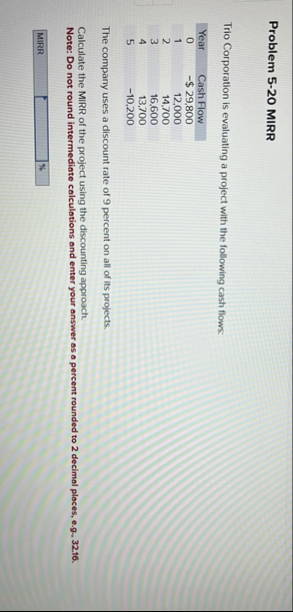
 Bik =
| EEE EA
| RHEE HE
= ES ;
HIT
| i
7
TT
(a
wo
Ri |
J i Ii
i.
=
i }
BE |
1 § H
J.
1.
1.
i §
;
Bik =
| EEE EA
| RHEE HE
= ES ;
HIT
| i
7
TT
(a
wo
Ri |
J i Ii
i.
=
i }
BE |
1 § H
J.
1.
1.
i §
;