 VIPSolutions
Give step-by-step solution with explanation and final answer:Problem 2: Make a SolidWorks part file and create a 3D model using the given dimensions below, then create a drawing file from your part file, add all necessary views, and fully dimension the drawing using conventions and ryles demonstrated in lecture. You must determine the front/top/right views. All dimensions are in MMGS, all sketches must be fully defined (125 points) Bonus: To test your ability to visualize in 3D, create this model using only two steps. Save your SolidWorks files using the following template: Homework 3 Problem 2 Last Name ad CaS oy & ~ ~ 5 See LS # ana Ne a i po KR ed Bs 5 Rigg 9, o's 0 FH # Oo v4 Pr 7, Cd 7 p 50 red 1001] 428 1
Question:
Give step-by-step solution with explanation and final answer: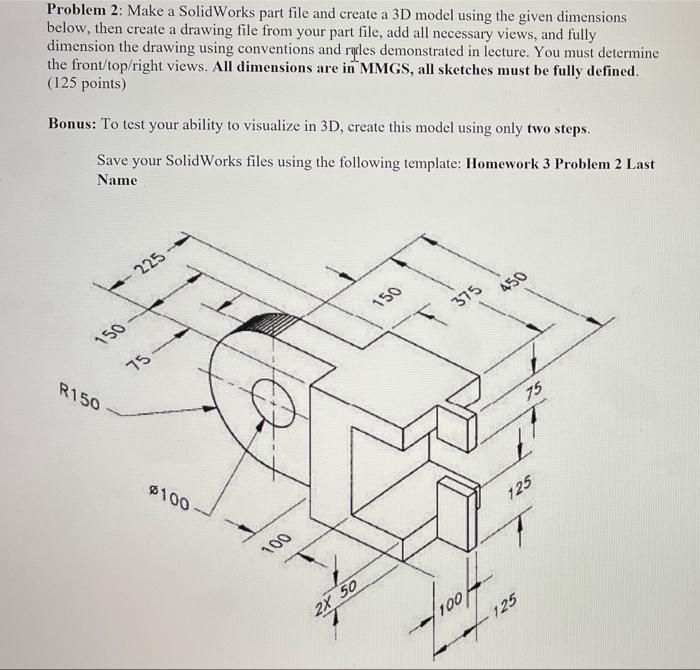 Problem 2: Make a SolidWorks part file and create a 3D model using the given dimensions
below, then create a drawing file from your part file, add all necessary views, and fully
dimension the drawing using conventions and ryles demonstrated in lecture. You must determine
the front/top/right views. All dimensions are in MMGS, all sketches must be fully defined
(125 points)
Bonus: To test your ability to visualize in 3D, create this model using only two steps.
Save your SolidWorks files using the following template: Homework 3 Problem 2 Last
Name
ad CaS oy
&
~ ~ 5
See LS
# ana
Ne a i po
KR
ed Bs
5
Rigg 9, o's
0 FH #
Oo v4 Pr
7,
Cd 7
p 50
red 1001] 428
1
Problem 2: Make a SolidWorks part file and create a 3D model using the given dimensions
below, then create a drawing file from your part file, add all necessary views, and fully
dimension the drawing using conventions and ryles demonstrated in lecture. You must determine
the front/top/right views. All dimensions are in MMGS, all sketches must be fully defined
(125 points)
Bonus: To test your ability to visualize in 3D, create this model using only two steps.
Save your SolidWorks files using the following template: Homework 3 Problem 2 Last
Name
ad CaS oy
&
~ ~ 5
See LS
# ana
Ne a i po
KR
ed Bs
5
Rigg 9, o's
0 FH #
Oo v4 Pr
7,
Cd 7
p 50
red 1001] 428
1
This is AI generated Response.
Asked by: Rahul
Created at: 2026-01-10 15:36:27
Asked by: Rahul
Created at: 2026-01-10 15:36:27
Final Answer:
Rendered
Raw Text
Did you like this answer?
# Step-by-Step SolidWorks Solution for Problem 2
Below is a **step-by-step guide** to create the 3D model as shown in the drawing using **SolidWorks**. This includes how to sketch, extrude, cut, and dimension the part. All dimensions are in **MMGS** (millimeter, gram, second).
---
## **Step 1: Analyze and Plan**
- **Shape:** The part consists of a main rectangular body, a semi-cylindrical back, a front slot, and a circular hole.
- **Main Features:**
- Rectangular base
- Semi-circular back
- Front fork/slot
- Hole through the semi-cylinder
---
## **Step 2: Create Main Body (Rectangular Section)**
1. **Start a new part** in SolidWorks.
2. **Front Plane → Sketch**
- Draw a rectangle: **Length = 450 mm**, **Height = 225 mm**.
- **Extrude** the rectangle to a **thickness of 100 mm**.
---
## **Step 3: Add Semi-Cylinder at the Back**
1. **On the left face** (back side), start a new sketch.
2. Draw a **semi-circle** with:
- **Radius = 150 mm** (centered vertically on the left face, at mid-height: 112.5 mm from base).
- **Draw horizontal line** connecting the ends of the semi-circle to form a closed region.
3. **Extrude Cut** (remove) the material outside the semi-circle, or **Extrude Boss/Base** if you prefer to add the semi-cylindrical feature as material.
- **Depth = 100 mm** (same as part thickness).
---
## **Step 4: Add Front Fork/Slot**
1. **Front face → Sketch**
2. Draw two rectangles to represent the slots:
- Each slot: **Width = 50 mm**, **Height = 125 mm**, **Spacing = 75 mm** between slots, as per dimensions.
- The slots start **100 mm** from the bottom.
3. **Extrude Cut** through all to remove the fork slots.
---
## **Step 5: Add Center Hole**
1. **On the semi-cylindrical face (back) → Sketch**
2. Draw a **circle**:
- **Diameter = 100 mm**
- Centered at the origin of the semi-circle (i.e., 112.5 mm above the bottom and 150 mm from the left edge)
3. **Extrude Cut** through all.
---
## **Step 6: Dimension and Finalize**
- **Add all necessary dimensions** to fully define sketches.
- **Check all measurements:**
- Total length: **450 mm**
- Overall height: **225 mm**
- Thickness: **100 mm**
- Fork slot widths: **50 mm each**
- Spacing: **75 mm** between fork arms
- Slot height: **125 mm**
- Back semi-cylinder: **R150 mm**, **hole Ø100 mm**
---
## **Step 7: Save and Export Drawing**
- Save your part as `Homework 3 Problem 2 Last Name`.
- **Create drawing** from part, add top/front/right views, and fully dimension as per conventions.
---
## **Summary Table of Key Dimensions**
| Feature | Dimension |
|----------------------|----------------|
| Overall Length | 450 mm |
| Height | 225 mm |
| Thickness | 100 mm |
| Semi-Cylinder Radius | 150 mm |
| Hole Diameter | 100 mm |
| Slot Width | 50 mm (each) |
| Fork Opening | 75 mm |
| Slot Height | 125 mm |
| Slot Position | 100 mm from bottom |
---
### **Final Answer**
Follow the above steps to construct the part in SolidWorks. Your final model should match the provided dimensions and features. The drawing file should have all required views and be fully dimensioned.
**If you need a written description for a report:**
> The part consists of a 450 mm x 225 mm x 100 mm rectangular block, with a semi-cylindrical back (R150 mm), a central circular hole (Ø100 mm), and a forked front with two 50 mm wide slots (125 mm tall, spaced 75 mm apart), starting 100 mm from the bottom face.
---
**If you have any questions about a specific step, let me know!**
📢 Instructions:
- Ask anything relatd to above question only.
- For new Question goto :