 VIPSolutions
Give step-by-step solution with explanation and final answer:Information Systems Business Management You can work in a group of up to 5 students. you will be responsible to form the groups. In this exercise, you will use spreadsheet software to calculate the cost of desktop systems, printers, and software. Use the Internet to obtain pricing information on hardware and software for an office of 30 people. You will need to price 30 PC desktop systems (monitors, computers, and keyboards) manufactured by Lenovo, Dell, and HP. (For this exercise, ignore the fact that desktop systems usually come with preloaded software packages). Also obtain pricing on 15 desktop printers manufactured by HP, Canon, and Brother. Each desktop system must satisfy the minimum specifications shown in the table. Desktop and Printer Specifications Each desktop system must satisfy the minimum specifications shown in the following table: MINIMUM DESKTOP SPECIFICATIONS Processor speed 3GHz Hard drive 500 GB RAM 4GB DVD-ROM drive DVD-RW Monitor (diagonal measurement) 18 inches Each desktop printer must satisfy the minimum specifications shown in the MINIMUM MONOCHROME PRINTER SPECIFICATIONS Print speed (black and white) 20 pages per minute Print resolution 600 x 600 Network ready? Yes Maximum price/unit $700 Also, obtain pricing on 30 licenses or copies of the most recent versions of Microsoft Office 365 Business and Apache Open Office (formerly Oracle Open Office) and 30 copies of Microsoft Windows 10 Pro. Each desktop productivity solution should contain software for word processing, spreadsheets, database, and presentations. Prepare a spreadsheet showing your research results for the desktop system, printer, and software combination offering the best performance and pricing per worker over two years. Because every two workers share one printer (15 printers/30 systems), your calculations should assume only half a printer cost per worker. You are expected to upload your file individually. For groups, make sure all the group member names and student numbers are on the first slide. Page1of1
Question:
Give step-by-step solution with explanation and final answer: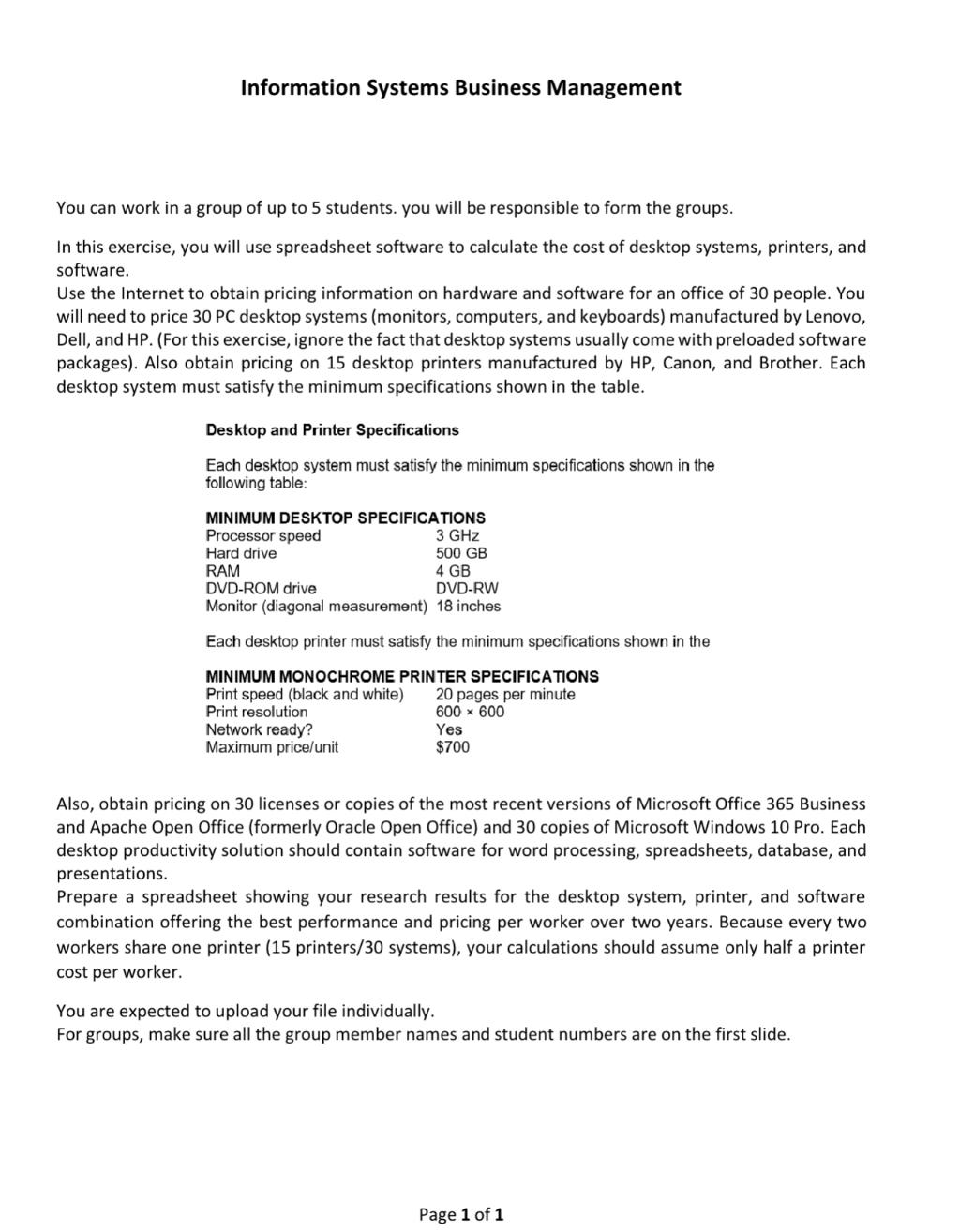 Information Systems Business Management
You can work in a group of up to 5 students. you will be responsible to form the groups.
In this exercise, you will use spreadsheet software to calculate the cost of desktop systems, printers, and
software.
Use the Internet to obtain pricing information on hardware and software for an office of 30 people. You
will need to price 30 PC desktop systems (monitors, computers, and keyboards) manufactured by Lenovo,
Dell, and HP. (For this exercise, ignore the fact that desktop systems usually come with preloaded software
packages). Also obtain pricing on 15 desktop printers manufactured by HP, Canon, and Brother. Each
desktop system must satisfy the minimum specifications shown in the table.
Desktop and Printer Specifications
Each desktop system must satisfy the minimum specifications shown in the
following table:
MINIMUM DESKTOP SPECIFICATIONS
Processor speed 3GHz
Hard drive 500 GB
RAM 4GB
DVD-ROM drive DVD-RW
Monitor (diagonal measurement) 18 inches
Each desktop printer must satisfy the minimum specifications shown in the
MINIMUM MONOCHROME PRINTER SPECIFICATIONS
Print speed (black and white) 20 pages per minute
Print resolution 600 x 600
Network ready? Yes
Maximum price/unit $700
Also, obtain pricing on 30 licenses or copies of the most recent versions of Microsoft Office 365 Business
and Apache Open Office (formerly Oracle Open Office) and 30 copies of Microsoft Windows 10 Pro. Each
desktop productivity solution should contain software for word processing, spreadsheets, database, and
presentations.
Prepare a spreadsheet showing your research results for the desktop system, printer, and software
combination offering the best performance and pricing per worker over two years. Because every two
workers share one printer (15 printers/30 systems), your calculations should assume only half a printer
cost per worker.
You are expected to upload your file individually.
For groups, make sure all the group member names and student numbers are on the first slide.
Page1of1
Information Systems Business Management
You can work in a group of up to 5 students. you will be responsible to form the groups.
In this exercise, you will use spreadsheet software to calculate the cost of desktop systems, printers, and
software.
Use the Internet to obtain pricing information on hardware and software for an office of 30 people. You
will need to price 30 PC desktop systems (monitors, computers, and keyboards) manufactured by Lenovo,
Dell, and HP. (For this exercise, ignore the fact that desktop systems usually come with preloaded software
packages). Also obtain pricing on 15 desktop printers manufactured by HP, Canon, and Brother. Each
desktop system must satisfy the minimum specifications shown in the table.
Desktop and Printer Specifications
Each desktop system must satisfy the minimum specifications shown in the
following table:
MINIMUM DESKTOP SPECIFICATIONS
Processor speed 3GHz
Hard drive 500 GB
RAM 4GB
DVD-ROM drive DVD-RW
Monitor (diagonal measurement) 18 inches
Each desktop printer must satisfy the minimum specifications shown in the
MINIMUM MONOCHROME PRINTER SPECIFICATIONS
Print speed (black and white) 20 pages per minute
Print resolution 600 x 600
Network ready? Yes
Maximum price/unit $700
Also, obtain pricing on 30 licenses or copies of the most recent versions of Microsoft Office 365 Business
and Apache Open Office (formerly Oracle Open Office) and 30 copies of Microsoft Windows 10 Pro. Each
desktop productivity solution should contain software for word processing, spreadsheets, database, and
presentations.
Prepare a spreadsheet showing your research results for the desktop system, printer, and software
combination offering the best performance and pricing per worker over two years. Because every two
workers share one printer (15 printers/30 systems), your calculations should assume only half a printer
cost per worker.
You are expected to upload your file individually.
For groups, make sure all the group member names and student numbers are on the first slide.
Page1of1
Asked by: gvr
Created at: 2025-07-29 07:50:33
Final Answer:
📢 Instructions:
- Ask anything relatd to above question only.
- For new Question goto :