 VIPSolutions
Give step-by-step solution with explanation and final answer:4.1 Evaluate the following MATLAB expressions. (@5 >= 5.5 (b) 34 < 34 (ec) xor (FIFR=EDINC ELS pil false (€) ~~(35 / 17) == (35 / 17) fH) (7
Question:
Give step-by-step solution with explanation and final answer: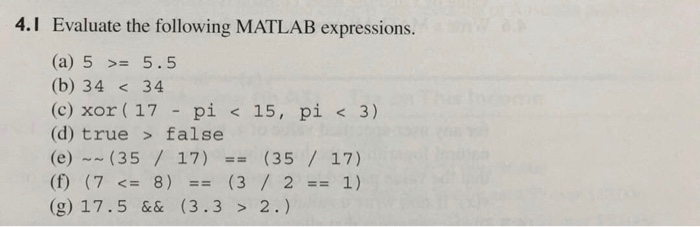 4.1 Evaluate the following MATLAB expressions.
(@5 >= 5.5
(b) 34 < 34
(ec) xor (FIFR=EDINC ELS pil false
(€) ~~(35 / 17) == (35 / 17)
fH) (7
4.1 Evaluate the following MATLAB expressions.
(@5 >= 5.5
(b) 34 < 34
(ec) xor (FIFR=EDINC ELS pil false
(€) ~~(35 / 17) == (35 / 17)
fH) (7
This is AI generated Response.
Asked by: gvr
Created at: 2025-08-02 14:56:29
Asked by: gvr
Created at: 2025-08-02 14:56:29
Final Answer:
Rendered
Raw Text
Did you like this answer?
Let's solve each MATLAB expression step by step:
---
### (a) \( 5 \geq 5.5 \)
- \( 5 \geq 5.5 \) evaluates if 5 is **greater than or equal to** 5.5.
- \( 5 \) is **not** greater than or equal to \( 5.5 \).
**Answer:** `false` or `0`
---
### (b) \( 34 < 34 \)
- \( 34 < 34 \) checks if 34 is **less than** 34.
- This is **false** because 34 is **equal** to 34, not less.
**Answer:** `false` or `0`
---
### (c) `xor(17 - pi < 15, pi < 3)`
Evaluate inside first:
- \( \pi \approx 3.1416 \)
- \( 17 - \pi \approx 13.8584 \)
- \( 13.8584 < 15 \) is **true**.
- \( \pi < 3 \) is **false**.
`xor(true, false)` is **true** (since only one is true).
**Answer:** `true` or `1`
---
### (d) `true > false`
- In MATLAB, `true` is `1` and `false` is `0`.
- \( 1 > 0 \) is **true**.
**Answer:** `true` or `1`
---
### (e) `~(35 / 17) == (35 / 17)`
- \( 35 / 17 \approx 2.0588 \)
- `~(35/17)` in MATLAB: `~` is the logical NOT, applied to nonzero values gives `false` (`0`).
- So, `~(35 / 17)` is `false` or `0`.
- `0 == 2.0588` is **false**.
**Answer:** `false` or `0`
---
### (f) `(7 <= 8) == (3 / 2 == 1)`
- \( 7 \leq 8 \) is **true** (`1`).
- \( 3 / 2 = 1.5 \), so \( 1.5 == 1 \) is **false** (`0`).
- \( 1 == 0 \) is **false**.
**Answer:** `false` or `0`
---
### (g) \( 17.5 \ \&\&\ (3.3 > 2.) \)
- \( 3.3 > 2.0 \) is **true** (`1`).
- In MATLAB, logical AND (`&&`) requires both sides to be logically true (nonzero).
- \( 17.5 \) is nonzero, so **true**.
- `true && true` is **true**.
**Answer:** `true` or `1`
---
## **Summary Table**
| Part | Expression | Answer (MATLAB) |
|------|-----------------------------------------------|-----------------|
| (a) | 5 >= 5.5 | 0 (false) |
| (b) | 34 < 34 | 0 (false) |
| (c) | xor(17 - pi < 15, pi < 3) | 1 (true) |
| (d) | true > false | 1 (true) |
| (e) | ~(35 / 17) == (35 / 17) | 0 (false) |
| (f) | (7 <= 8) == (3 / 2 == 1) | 0 (false) |
| (g) | 17.5 && (3.3 > 2.) | 1 (true) |
Question:
i need step by step detailed explanation and calculations of each part along with the final answer without table
This is AI generated Response.
Asked by: gvr
Created at: 2025-08-02 14:58:40
Asked by: gvr
Created at: 2025-08-02 14:58:40
Final Answer:
Rendered
Raw Text
Did you like this answer?
Let's evaluate each MATLAB expression step-by-step with detailed explanations:
---
**Part (a):** `5 >= 5.5`
- The `>=` operator checks if the left operand is **greater than or equal to** the right operand.
- Here, compare 5 and 5.5:
- 5 is **less** than 5.5.
- Therefore, **5 >= 5.5** evaluates to **false**.
- In MATLAB, `false` is represented as `0`.
**Final answer:** `0`
---
**Part (b):** `34 < 34`
- The `<` operator checks if the left operand is **less than** the right operand.
- Here, compare 34 and 34:
- 34 is **equal** to 34, not less.
- So, **34 < 34** evaluates to **false**.
- In MATLAB, this is `0`.
**Final answer:** `0`
---
**Part (c):** `xor(17 - pi < 15, pi < 3)`
- First, evaluate each logical condition:
- `17 - pi < 15`
- \( \pi \approx 3.1416 \),
- \( 17 - 3.1416 \approx 13.8584 \),
- Is 13.8584 < 15? Yes, **true**.
- `pi < 3`
- Is 3.1416 < 3? No, **false**.
- Now, `xor(true, false)`:
- `xor` returns **true** if exactly one argument is true.
- Since one is true and the other false, the result is **true**.
- In MATLAB, `true` is represented as `1`.
**Final answer:** `1`
---
**Part (d):** `true > false`
- In MATLAB:
- `true` = `1`,
- `false` = `0`.
- Evaluate `1 > 0`: Is 1 greater than 0? Yes.
- Therefore, the expression evaluates to **true**.
- MATLAB's `true` is `1`.
**Final answer:** `1`
---
**Part (e):** `~(35 / 17) == (35 / 17)`
- Calculate `35 / 17`:
- \( 35 / 17 \approx 2.0588 \).
- Apply the logical NOT operator `~`:
- In MATLAB, `~` applied to a nonzero number treats it as logical true (1), so:
- `~(2.0588)` converts 2.0588 to logical true (`1`), then negates it:
- `~(nonzero)` yields **false** (`0`).
- So, `~(35 / 17)` results in `0`.
- Now compare:
- `0 == 2.0588`:
- Is 0 equal to 2.0588? No, **false**.
- MATLAB's boolean `false` is `0`.
**Final answer:** `0`
---
**Part (f):** `(7 <= 8) == (3 / 2 == 1)`
- Evaluate `(7 <= 8)`:
- 7 less than or equal to 8? Yes, **true** (`1`).
- Evaluate `(3 / 2 == 1)`:
- \( 3 / 2 = 1.5 \),
- Is 1.5 equal to 1? No, **false** (`0`).
- Now, compare the two results:
- `1 == 0`? No, **false**.
- MATLAB's `false` is `0`.
**Final answer:** `0`
---
**Part (g):** `17.5 && (3.3 > 2.)`
- First, evaluate `(3.3 > 2.)`:
- Is 3.3 greater than 2? Yes, **true** (`1`).
- The logical AND operator `&&` in MATLAB:
- Requires both operands to be true.
- The first operand is `17.5`:
- In MATLAB, any non-zero number is considered **true**.
- The second operand is `1` (true).
- Therefore:
- `true && true` yields **true** (`1`).
**Final answer:** `1`
---
**Summary of all parts:**
- **(a):** 0
- **(b):** 0
- **(c):** 1
- **(d):** 1
- **(e):** 0
- **(f):** 0
- **(g):** 1
This completes the step-by-step evaluation with detailed explanations.
📢 Instructions:
- Ask anything relatd to above question only.
- For new Question goto :