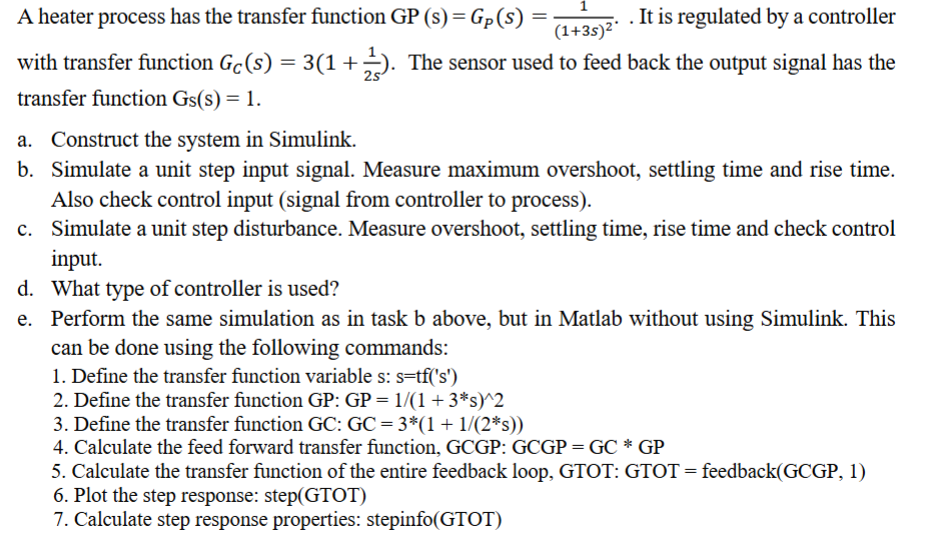
Give step-by-step solution with explanation and final answer:A heater process has the transfer function GP (s) = Gp(s) = Te .Itis regulated by a controller
with transfer function G(s) = 3(1 + 2 The sensor used to feed back the output signal has the
transfer function Gs(s) = 1.
a. Construct the system in Simulink.
b. Simulate a unit step input signal. Measure maximum overshoot, settling time and rise time.
Also check control input (signal from controller to process).
c. Simulate a unit step disturbance. Measure overshoot, settling time, rise time and check control
input.
d. ‘What type of controller is used?
e. Perform the same simulation as in task b above, but in Matlab without using Simulink. This
can be done using the following commands:
1. Define the transfer function variable s: s=tf{('s")
2. Define the transfer function GP: GP = 1/(1 + 3*s)"2
3. Define the transfer function GC: GC = 3*(1 + 1/(2*s))
4. Calculate the feed forward transfer function, GCGP: GCGP = GC * GP
5. Calculate the transfer function of the entire feedback loop, GTOT: GTOT = feedback(GCGP, 1)
6. Plot the step response: step(GTOT)
7. Calculate step response properties: stepinfo(GTOT)
Question:
Give step-by-step solution with explanation and final answer:A heater process has the transfer function GP (s) = Gp(s) = Te .Itis regulated by a controller
with transfer function G(s) = 3(1 + 2 The sensor used to feed back the output signal has the
transfer function Gs(s) = 1.
a. Construct the system in Simulink.
b. Simulate a unit step input signal. Measure maximum overshoot, settling time and rise time.
Also check control input (signal from controller to process).
c. Simulate a unit step disturbance. Measure overshoot, settling time, rise time and check control
input.
d. ‘What type of controller is used?
e. Perform the same simulation as in task b above, but in Matlab without using Simulink. This
can be done using the following commands:
1. Define the transfer function variable s: s=tf{('s")
2. Define the transfer function GP: GP = 1/(1 + 3*s)"2
3. Define the transfer function GC: GC = 3*(1 + 1/(2*s))
4. Calculate the feed forward transfer function, GCGP: GCGP = GC * GP
5. Calculate the transfer function of the entire feedback loop, GTOT: GTOT = feedback(GCGP, 1)
6. Plot the step response: step(GTOT)
7. Calculate step response properties: stepinfo(GTOT)
This is AI generated Response.
Asked by: M Murali
Created at: 2025-11-03 06:15:04
Final Answer:
RenderedRaw Text
Did you like this answer?
Let's solve the problem step by step:
---
## **Given Transfer Functions**
- **Process (Plant):**
\[
G_P(s) = \frac{1}{(1 + 3s)^2}
\]
- **Controller:**
\[
G_C(s) = 3 \left(1 + \frac{1}{2s}\right)
\]
- **Sensor:**
\[
G_S(s) = 1
\]
---
## **a. Construct the System in Simulink**
**Blocks to Use:**
- **Sum** (for feedback)
- **Transfer Function** (for \( G_P(s) \))
- **Transfer Function** (for \( G_C(s) \))
- **Step Input** (to provide step input)
- **Scope** (to view outputs)
- **Gain** (if needed)
- **(Optional) Disturbance Input**
**Configuration:**
1. Step input to the **sum block** (+ and - for feedback).
2. **Sum block** output to **controller** (\( G_C(s) \)).
3. **Controller output** to **process** (\( G_P(s) \)).
4. **Process output** to **scope** and back to **sum block** (feedback).
5. To measure control input, connect a scope after \( G_C(s) \).
---
## **b. Simulate Unit Step Input (in Simulink)**
**Steps:**
1. Run the simulation with a **step input**.
2. Measure:
- **Maximum overshoot**
- **Settling time**
- **Rise time**
- **Control input** (output of \( G_C(s) \) block)
---
## **c. Simulate Unit Step Disturbance**
**Steps:**
1. Add a **step disturbance** at the process input.
2. Run the simulation.
3. Measure:
- **Maximum overshoot**
- **Settling time**
- **Rise time**
- **Control input**
---
## **d. What Type of Controller is Used?**
Expand \( G_C(s) \):
\[
G_C(s) = 3\left(1 + \frac{1}{2s}\right) = 3 + \frac{3}{2s}
\]
This is a **Proportional-Integral (PI) Controller**:
- **Proportional term:** \( 3 \)
- **Integral term:** \( \frac{3}{2s} \)
---
## **e. Simulate in MATLAB (Without Simulink)**
### **MATLAB Code Steps**
```matlab
% 1. Define s as the Laplace variable
s = tf('s');
% 2. Define the transfer function of the process
GP = 1 / (1 + 3*s)^2;
% 3. Define the controller transfer function
GC = 3 * (1 + 1/(2*s));
% 4. Calculate the open-loop transfer function
GCGP = GC * GP;
% 5. Calculate the closed-loop transfer function
GTOT = feedback(GCGP, 1);
% 6. Plot the step response
step(GTOT);
% 7. Calculate step response properties
S = stepinfo(GTOT);
disp(S);
```
### **Explanation of Each Step**
1. **Laplace Variable:**
`s = tf('s');`
This creates a Laplace variable for transfer functions.
2. **Process Transfer Function:**
`GP = 1 / (1 + 3*s)^2;`
3. **Controller Transfer Function:**
`GC = 3 * (1 + 1/(2*s));`
4. **Open-Loop Transfer Function:**
`GCGP = GC * GP;`
5. **Closed-Loop System:**
`GTOT = feedback(GCGP, 1);`
This creates a unity feedback system.
6. **Plot Step Response:**
`step(GTOT);`
7. **Calculate Step Response Info:**
`stepinfo(GTOT);`
This gives overshoot, settling time, rise time, etc.
---
### **Summary Table**
| Task | Step(s) | Output/Result |
|--------|---------|---------------|
| a | Simulink construction as per above block diagram | System built |
| b | Step input, measure response | Overshoot, rise time, settling time, control input |
| c | Step disturbance, measure response | Overshoot, rise time, settling time, control input |
| d | Controller Type | PI Controller |
| e | MATLAB code as above | Step response plot and metrics |
---
## **Final Answers**
- **Controller Type:** PI Controller (\( 3 + \frac{3}{2s} \))
- **Simulation in Simulink:** Follow the block diagram as described.
- **Simulation in MATLAB:** Use the code above.
- **Measured Quantities:** Use `stepinfo` in MATLAB for:
- Maximum overshoot
- Settling time
- Rise time
### **(You will get the numerical values for overshoot, settling time, rise time after running the MATLAB code).**
---
Let me know if you'd like help constructing the Simulink diagram or interpreting MATLAB output!
VIPSolutions focuses on clear, step‑by‑step explanations so you can learn quickly. Whether you need an AI‑generated walkthrough or a short hint to get unstuck, each solution is organized for fast reading and easy review later.
Search similar questions, compare approaches, and bookmark the best answers for revision. Our goal is simple: quick, reliable study help that feels natural—not noisy.
 VIPSolutions
 A heater process has the transfer function GP (s) = Gp(s) = Te .Itis regulated by a controller
with transfer function G(s) = 3(1 + 2 The sensor used to feed back the output signal has the
transfer function Gs(s) = 1.
a. Construct the system in Simulink.
b. Simulate a unit step input signal. Measure maximum overshoot, settling time and rise time.
Also check control input (signal from controller to process).
c. Simulate a unit step disturbance. Measure overshoot, settling time, rise time and check control
input.
d. ‘What type of controller is used?
e. Perform the same simulation as in task b above, but in Matlab without using Simulink. This
can be done using the following commands:
1. Define the transfer function variable s: s=tf{('s")
2. Define the transfer function GP: GP = 1/(1 + 3*s)"2
3. Define the transfer function GC: GC = 3*(1 + 1/(2*s))
4. Calculate the feed forward transfer function, GCGP: GCGP = GC * GP
5. Calculate the transfer function of the entire feedback loop, GTOT: GTOT = feedback(GCGP, 1)
6. Plot the step response: step(GTOT)
7. Calculate step response properties: stepinfo(GTOT)
A heater process has the transfer function GP (s) = Gp(s) = Te .Itis regulated by a controller
with transfer function G(s) = 3(1 + 2 The sensor used to feed back the output signal has the
transfer function Gs(s) = 1.
a. Construct the system in Simulink.
b. Simulate a unit step input signal. Measure maximum overshoot, settling time and rise time.
Also check control input (signal from controller to process).
c. Simulate a unit step disturbance. Measure overshoot, settling time, rise time and check control
input.
d. ‘What type of controller is used?
e. Perform the same simulation as in task b above, but in Matlab without using Simulink. This
can be done using the following commands:
1. Define the transfer function variable s: s=tf{('s")
2. Define the transfer function GP: GP = 1/(1 + 3*s)"2
3. Define the transfer function GC: GC = 3*(1 + 1/(2*s))
4. Calculate the feed forward transfer function, GCGP: GCGP = GC * GP
5. Calculate the transfer function of the entire feedback loop, GTOT: GTOT = feedback(GCGP, 1)
6. Plot the step response: step(GTOT)
7. Calculate step response properties: stepinfo(GTOT)